您现在的位置: 萬盛學電腦網 >> 電腦基礎知識 > >> 電腦基本常識
Windows 命令列設定靜態 IP/DNS 完整指令碼 (netsh interface ip 實戰)
圖形介面設定 IP 有時失效 (Win10 預覽版、Server Core、遠端無桌面),`netsh interface ip` 指令提供完整命令列解決方案。本文整理單行指令模式、參數對照、恢復 DHCP、DNS 設定、PowerShell 現代替代方案,適用 Win7/8/10/11/Server 全系列。
開啟管理員命令提示字元
Win+R → `cmd` → Ctrl+Shift+Enter (或右鍵「以系統管理員身分執行」)。

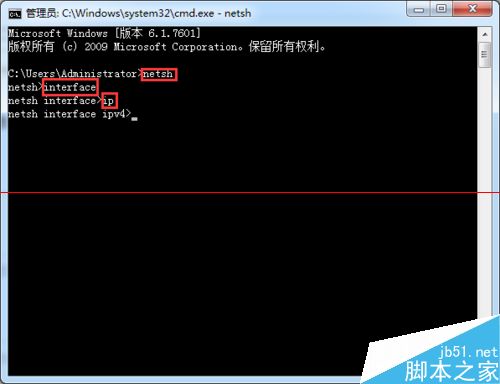
單行指令速查 (直接複製貼上執行)
:: 設定靜態 IP (介面名稱需完全一致,含空格請加雙引號)
netsh interface ip set address "乙太網路" static 192.168.1.100 255.255.255.0 192.168.1.1 1

:: 設定靜態 DNS
netsh interface ip set dns "乙太網路" static 8.8.8.8

:: 新增第二組 DNS
netsh interface ip add dns "乙太網路" 8.8.4.4 index=2

:: 恢復 DHCP 自動取得 IP
netsh interface ip set address "乙太網路" dhcp

:: 恢復 DHCP 自動取得 DNS
netsh interface ip set dns "乙太網路" dhcp

:: 查詢目前設定
netsh interface ip show config "乙太網路"
netsh interface ip show dnsservers "乙太網路"
參數詳細說明
| 參數 | 範例 | 說明 |
|---|---|---|
| 介面名稱 | "乙太網路", "Wi-Fi", "區域連線" | 需與 `ncpa.cpl` / `netsh interface show interface` 顯示完全一致,支援中文,必須英文雙引號 |
| static | static | 指定靜態參數模式 |
| IP 位址 | 192.168.1.100 | 目標靜態 IP |
| 子網路遮罩 | 255.255.255.0 | /24 等同 255.255.255.0 |
| 預設閘道 | 192.168.1.1 | 路由器 LAN IP |
| 閘道度量 | 1 | 結尾必須輸入 1 代表啟用,不可省略 |
常見錯誤排解
- 「無法找到介面」:名稱不符 → `netsh interface show interface` 列出正確名稱。
- 「存取被拒」:未以管理員執行 → 以系統管理員身分開啟 CMD/PowerShell。
- IP 衝突:目標 IP 在 DHCP 範圍內或被佔用 → 改用 DHCP 保留或選擇範圍外 IP。
- DNS 不生效:`ipconfig /flushdns` 清除快取,或重啟 `Dnscache` 服務。
PowerShell 現代替代方案 (Win10/11/Server 2016+ 原生)
# 設定靜態 IP
New-NetIPAddress -InterfaceAlias "乙太網路" -IPAddress 192.168.1.100 -PrefixLength 24 -DefaultGateway 192.168.1.1

# 設定 DNS
Set-DnsClientServerAddress -InterfaceAlias "乙太網路" -ServerAddresses 8.8.8.8, 8.8.4.4

# 恢復 DHCP
Remove-NetIPAddress -InterfaceAlias "乙太網路" -IPAddress 192.168.1.100 -Confirm:$false
Set-DnsClientServerAddress -InterfaceAlias "乙太網路" -ResetServerAddresses

# 查詢
Get-NetIPConfiguration -InterfaceAlias "乙太網路"
自動化部署建議
將指令封裝為 `.bat`/.ps1,搭配 `psexec`/`Invoke-Command` 實現多機器批次靜態 IP 佈署,或整合至 MDT/SCCM/Ansible 任務序列。
推薦文章
- 磁帶機備份技術全面解析:介質、驅動器、磁帶庫、軟體與策略
- CMD 命令提示字元大全:100+ 實用指令速查表 (系統管理、網路、磁碟、登錄…
- 開機顯示 Memtest86+ V2.11 藍屏/卡住解決:BIOS 恢復預設 …
- IE 瀏覽器地址列輸入網址即卡住?系統修復輕鬆搞定
- Ghost 硬碟備份還原全攻略:核心功能與避坑指南
- Word 文件無法開啟?兩大快速修復方案(安全模式/刪除範本)
- 桌面圖示左下角小黃鎖怎麼去除?兩種方法:加入 Authenticated Use…
- 路由器 vs 交換機:核心差異、工作層級、轉發依據與防火牆功能深度對比
- Win8 啟用無線零組態 (WZC) 服務,解決無法掃描/連接 Wi-Fi 問題
- Windows 8 取消 Media Player 預設播放器的兩種實用方法
copyright © 萬盛學電腦網 all rights reserved