您现在的位置: 萬盛學電腦網 >> 電腦基礎知識 > >> 電腦基本常識
BetterTouchTool (BTT) Mac 觸控板手勢深度設定教學:從系統偏好到進階自訂
BetterTouchTool (BTT) 是 Mac 上最強大的輸入裝置自訂工具,能將觸控板、Magic Mouse、鍵盤、Siri Remote 等裝置的手勢/按鍵映射為任意動作(鍵盤快捷鍵、選單指令、腳本、視窗管理等),徹底釋放硬體潛能。本文涵蓋系統偏好預處理、手勢對照表、個人常用設定、進階動作配置全流程。
一、系統偏好設定預處理(避免衝突)
先關閉系統內建會與 BTT 衝突的手勢:
- 「觸控板」→「指點與點擊」:勾選「輕點來點選」(單指輕觸即點選,取代三指拖移),取消勾選「查詢」與「三指拖移」。
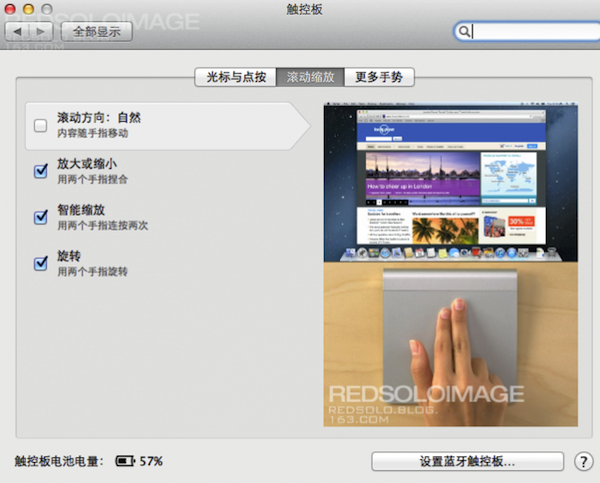
- 「捲動與縮放」:捲動方向依個人習慣(取消勾選則同 Windows 慣性)。
- 「更多手勢」:全部取消勾選(頁面間滑動、通知中心、Mission Control 等交由 BTT 統一管理)。



二、BTT 手勢對照表(官方英文術語中文對照)
BTT 手勢名稱較抽象,以下為常用手勢中文對照(部分手勢可在 BTT 設定視窗預覽動畫):
| 類別 | BTT 英文名稱 | 中文動作說明 |
|---|---|---|
| 單指 | corner click bottom left | 左下角點擊 |
| corner click bottom right | 右下角點擊 | |
| single finger tap top left | 單指輕觸左上角 | |
| single finger tap top middle | 單指輕觸上緣中點 | |
| single finger tap top right | 單指輕觸右上角 | |
| single finger bottom tap left | 單指輕觸左下角 | |
| single finger bottom tap middle | 單指輕觸下緣中點 | |
| single finger bottom tap right | 單指輕觸右下角 | |
| single finger tap left side middle | 單指輕觸左緣中點 | |
| single finger tap right side middle | 單指輕觸右緣中點 | |
| 雙指 | tipap left | 中指固定,食指輕觸 |
| tipap right | 食指固定,中指輕觸 | |
| pinch in | 雙指捏合 | |
| pinch out | 雙指張開 | |
| rotate left | 雙指逆時針旋轉 | |
| rotate right | 雙指順時針旋轉 | |
| scroll up (modifier key needed) | 雙指向上滑動(需設定修飾鍵) | |
| scroll down (modifier key needed) | 雙指向下滑動(需設定修飾鍵) | |
| two finger swipe up | 雙指向上滑 | |
| two finger swipe down | 雙指向下滑 | |
| two finger swipe left | 雙指向左滑 | |
| two finger swipe right | 雙指向右滑 | |
| two finger swipe from top edge | 雙指從上緣向下滑 | |
| two finger swipe from bottom edge | 雙指從下緣向上滑 | |
| two finger swipe from left edge | 雙指從左緣向右滑 | |
| two finger swipe from right edge | 雙指從右緣向左滑 | |
| 三指 | three finger tap | 三指輕觸 |
| three finger double tap | 三指雙擊 | |
| three finger tap top | 三指觸碰上緣 | |
| three finger tap bottom | 三指觸碰下緣 | |
| three finger click | 三指用力按下 | |
| three finger swipe up | 三指向上滑 | |
| three finger swipe down | 三指向下滑 | |
| three finger swipe left | 三指向左滑 | |
| three finger swipe right | 三指向右滑 | |
| three finger click swipe up | 三指按下並向上滑 | |
| three finger click swipe down | 三指按下並向下滑 | |
| three finger click swipe left | 三指按下並向左滑 | |
| three finger click swipe right | 三指按下並向右滑 | |
| two finger tip tap left | 兩指固定,第三指觸碰左側 | |
| two finger tip tap middle | 兩指固定,第三指觸碰中間 | |
| two finger tip tap right | 兩指固定,第三指觸碰右側 | |
| tip swipe left finger up | 右兩指固定,左指向上滑 | |
| tip swipe left finger down | 右兩指固定,左指向下滑 | |
| tip swipe left finger left | 右兩指固定,左指向左滑 | |
| tip swipe left finger right | 右兩指固定,左指向右滑 | |
| 四指 | four finger tap | 四指輕觸 |
| four finger double tap | 四指雙擊 | |
| four finger click | 四指按下 | |
| four finger swipe up | 四指向上滑 | |
| four finger swipe down | 四指向下滑 | |
| four finger swipe left | 四指向左滑 | |
| four finger swipe right | 四指向右滑 | |
| three finger tip top left | 中/無名/小指固定,食指點擊 | |
| three finger tip top right | 食/中/無名指固定,小指點擊 | |
| 五指 | five finger tap | 五指輕觸 |
| five finger click | 五指按下 | |
| five finger swipe up | 五指向上滑 | |
| five finger swipe down | 五指向下滑 | |
| five finger swipe left | 五指向左滑 | |
| five finger swipe right | 五指向右滑 | |
| five finger touch/move | 五指觸碰/移動 | |
| 11 finger tap / whole hand | 全掌觸碰(六指以上) | |
| 自訂 | Custom | 多指依序點擊(類彈鋼琴) |

三、個人常用系統級手勢設定(供參考)
- 返回:雙指左滑 (Finder、瀏覽器)
- 前進:雙指右滑 (Finder、瀏覽器)
- 音量減:雙指固定中指,食指連點
- 音量增:雙指固定食指,中指連點
- 螢幕亮度增:三指(食中無)固定食中,無名指連點
- 螢幕亮度降:三指固定無名中,食指連點
- 關閉分頁/視窗/程式:三指雙擊
- 複製:選取後三指上滑(記憶:推上剪貼簿)
- 貼上:游標定位後三指下滑(記憶:從剪貼簿拉下)
- 復原:三指左滑(記憶:打臉向左)
- 重做:三指右滑(記憶:從左打回右)
- 重啟 BTT:三指同時點擊觸控板
四、進階動作:啟動應用、控制音量、執行腳本
BTT 不僅映射鍵盤快捷鍵,還可直接綁定:
- 開啟應用程式/檔案/網址
- 系統音量/亮度微調(可設定步進值)
- 視窗管理:靠邊佔半、最大化、移至下一螢幕等(替代 Magnet/BetterSnapTool)
- AppleScript / Shell Script / JavaScript for Automation:實現複雜自動化流程。
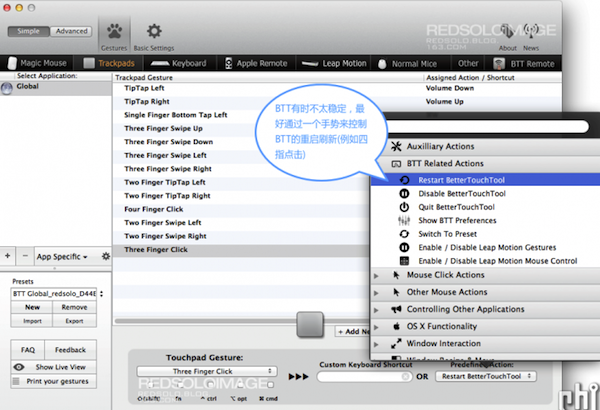


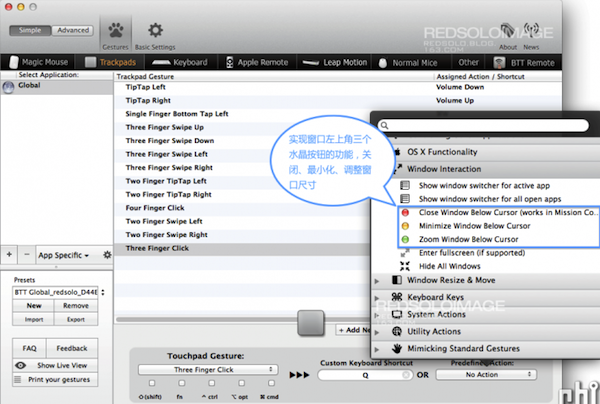
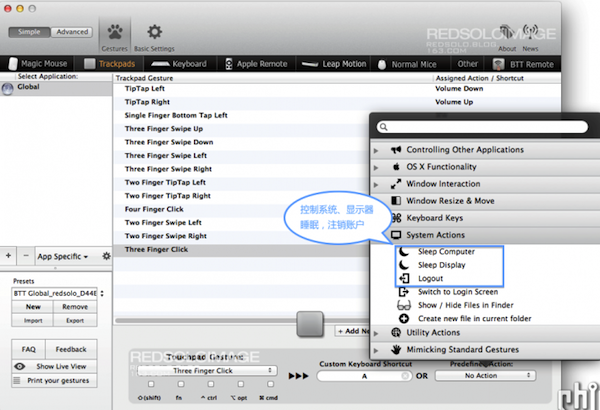
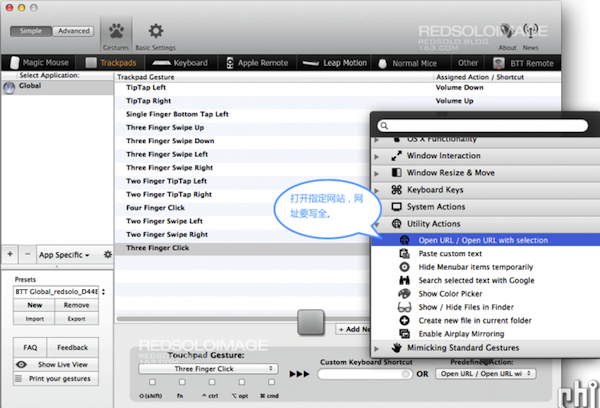
BTT 設定檔可匯出備份、跨裝置同步(iCloud/Dropbox),是 Mac 進階用戶必備神器。建議從少量高頻手勢開始,養成肌肉記憶後再逐步擴展。
- 上一篇電腦基礎: 磁碟重組有什麼用?原理、效果與 SSD 注意事項完整解析
- 下一篇電腦基礎: 筆電連接投影機設定全攻略:快捷鍵、顯卡控制面板、硬體注意事項
推薦文章
- Windows Defender 無法清除惡意軟體 Win32/PigSearc…
- 如何用 ping 指令測試網路延遲與穩定度?新手圖文教學
- 資料夾設定權限:讓特定使用者無法存取與刪除
- Windows XP 光碟無法自動播放?兩招啟用「自動播放」功能
- 打印隊列卡住無法刪除?三步徹底清理頑固打印任務
- 驍龍 615 vs 801 深度對比:中端八核 64 位 vs 旗艦四核,誰更強…
- 30 秒自製「系統垃圾清理器」:一鍵掃除臨時檔、Log、快取
- CPU 溫度多少正常?AMD/Intel 處理器與筆電溫度參考標準全攻略
- Windows 登錄表五大根鍵詳解:HKEY_CLASSES_ROOT 到 HK…
- DOCX 檔案是什麼?無法開啟時的五大解決方案
copyright © 萬盛學電腦網 all rights reserved