您现在的位置: 萬盛學電腦網 >> 手機 > >> 手機應用 >> Android 教學
安卓 App 去廣告核心原理與實操教程:修改 Smali 代碼屏蔽廣告 SDK
安卓應用去廣告深度技術指南:從原理到實戰
本文針對有一定逆向基礎的開發者/愛好者,闡述通過反編譯修改 APK 徹底移除廣告的核心邏輯與步驟。
廣告加載機制原理
- App 集成廣告 SDK (AdMob/Google Ads),在
AndroidManifest.xml註冊組件。 - 布局文件 (
res/layout/) 定義廣告 View 容器 (AdView)。 - 運行時向廣告服務器請求素材(下載源),填充展示。
去廣告雙管齊下策略
1. 屏蔽廣告下載源 (阻斷數據源頭)
- 反編譯 APK,用 Notepad++ 搜索已知廣告下載域名:
AdMob: r.admob.com, mm.admob.com, api.admob.com
Google Ads: pagead2.googlesyndication.com
- 在
classes.dex(需先用baksmali反編譯為 smali) 或字符串常量池中將上述域名替換為無效地址 (如0.0.0.0,192.168.1.1)。 - 重新打包
classes.dex替換回 APK。
2. 隱藏廣告 View 容器 (移除視覺呈現)
- 用 APKTool 反編譯資源文件。
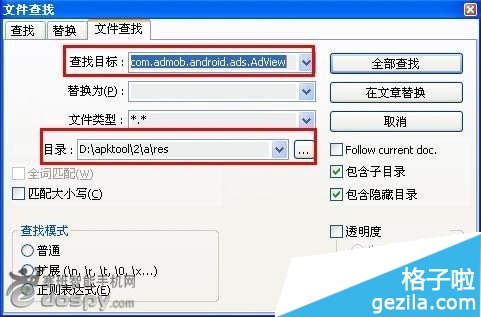
- 搜索廣告 View 類名:
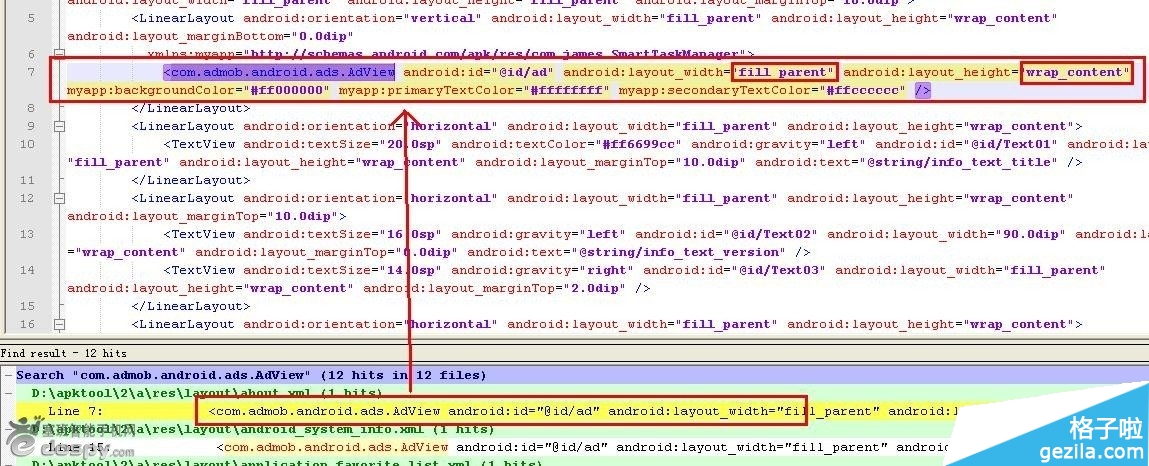
com.admob.android.ads.AdView、com.google.ads.GoogleAdView或布局 XML 中的android:id="@+id/ad"/@+id/adview。 - 修改對應布局 XML 中的寬高屬性:
android:layout_width="fill_parent"→android:layout_width="0.0dip"
android:layout_height="wrap_content"→android:layout_height="0.0dip" - 將所有匹配項同樣修改,APKTool 重新打包、簽名、安裝。
原理解析
將廣告容器寬高設為 0 像素,使其佈局佔用空間為零,達到「不顯示」目的;同時屏蔽下載源可節省流量與請求開銷。注意: 部分 App 會校驗簽名或完整性,修改後可能無法運行或觸發保護機制。僅供技術研究,請尊重開發者勞動成果,支持正版去廣告版或訂閱制。




- 上一篇智能手機: 榮耀7 鏡子應用隱藏玩法:水霧寫字與炸裂屏幕特效
- 下一篇智能手機: 模組化手機優缺點深度剖析:Project Ara 的理想與現實
推薦文章
- 什麼是Root權限?Android超級用戶帳戶深度解析
- 紅米 Note 記憶卡音樂搜尋不到?三大原因與解法
- 《野外阻擊戰 Fieldrunners HD》Android 版評測:高清塔防大…
- 刷機精靈:如何查看手機當前 Recovery 版本號 (自動/手動雙法)
- 三星 Galaxy S6 Edge 開啟人物側屏功能:邊緣螢幕快速聯繫重要聯絡人
- 三星 Galaxy Note 2 聯通版 (N7102) 變磚施救方案
- 刷機精靈大易 W1 官方線刷恢復教程
- 1 號店 Android 3.0 版體驗:重新定義行動購物新境界
- Android 手機 QQ 郵箱設定圖文教程:POP3/SMTP 完整配置步驟
- Android 5.0 更換字體教學:Root + RE 管理器,OTF 格式取…
copyright © 萬盛學電腦網 all rights reserved