您现在的位置: 萬盛學電腦網 >> 程式設計 > >> 網路程式設計 >> 程式語言綜合
C# 使用 AForge.NET 實現攝像頭拍照、預覽與錄影
專案架構
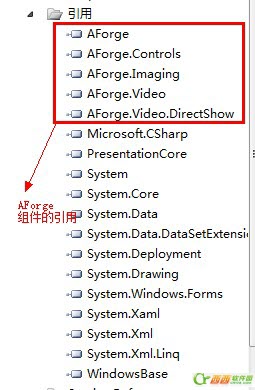
- WinForms 專案,引用 AForge.Video.DirectShow、AForge.Controls、AForge.Video.FFMPEG(錄影需)。
- 工具箱拖入
VideoSourcePlayer(來自 AForge.Controls)作為預覽畫面。

核心代碼
1. 列舉裝置並綁定 ComboBox
private FilterInfoCollection videoDevices;

private void Form1_Load(object sender, EventArgs e) {
    try {
        videoDevices = new FilterInfoCollection(FilterCategory.VideoInputDevice);
        if (videoDevices.Count == 0) throw new ApplicationException();
        foreach (FilterInfo dev in videoDevices)
            tscbxCameras.Items.Add(dev.Name);
        tscbxCameras.SelectedIndex = 0;
    } catch {
        tscbxCameras.Items.Add("No local capture devices");
        videoDevices = null;
    }
}
2. 連線/預覽
private void CameraConn() {
    var videoSource = new VideoCaptureDevice(videoDevices[tscbxCameras.SelectedIndex].MonikerString);
    videoSource.DesiredFrameSize = new Size(320, 240);
    videoSource.DesiredFrameRate = 15;
    videoSourcePlayer.VideoSource = videoSource;
    videoSourcePlayer.Start();
}
3. 關閉裝置
private void btnClose_Click(object sender, EventArgs e) {
    videoSourcePlayer.SignalToStop();
    videoSourcePlayer.WaitForStop();
}
4. 拍照存檔(PNG)
private void Photograph_Click(object sender, EventArgs e) {
    try {
        if (videoSourcePlayer.IsRunning) {
            var bitmap = videoSourcePlayer.GetCurrentVideoFrame();
            string path = GetImagePath() + "\\xiaosy.jpg";
            if (File.Exists(path)) File.Delete(path);
            bitmap.Save(path, ImageFormat.Jpeg); // 直接用 GDI+ 儲存

            // 關閉裝置並關閉視窗
            videoSourcePlayer.SignalToStop();
            videoSourcePlayer.WaitForStop();
            this.Close();
        }
    } catch (Exception ex) {
        MessageBox.Show("攝像頭異常:" + ex.Message);
    }
}

private string GetImagePath() {
    string dir = Path.Combine(AppDomain.CurrentDomain.BaseDirectory, "PersonImg");
    if (!Directory.Exists(dir)) Directory.CreateDirectory(dir);
    return dir;
}
錄影擴充提示
引用 AForge.Video.FFMPEG,使用 VideoFileWriter 在 `NewFrame` 事件中寫入幀,停止時呼叫 `Close()`。下一篇將補充完整錄影範例。
- 上一篇程序編程: AJAX error 回呼無法捕捉後端檢查型異常的解決方法
- 下一篇程序編程: AutoLISP 刪除 AutoCAD 指定圖層實體的完整指南
推薦文章
- Python encode() 方法詳解:字串編碼為位元組序列
- VBScript GenerateSDDL 函數:透過 WMI 程式化設定檔案/…
- C++ 設計三則:避免濫用虛函數、邏輯運算與純虛函數默認實現
- 界面與數據徹底分離:基於 jQuery 回調機制的輕量級實現範例
- Python 判斷字串是否包含指定字符集合任一字符:三種方法效能對比
- Python 字典排序完全指南:按鍵/值排序、lambda 鍵函數、效能對比
- VBE 解碼器:還原 screnc.exe 編碼的 .vbe/.jse/.asp…
- PostgreSQL 分區表自動建立與刪除函數
- C# 撰寫 Windows Service 基礎流程完整教學
- Mac OS X 搭建 Go 語言開發環境:Sublime Text 2 + G…
copyright © 萬盛學電腦網 all rights reserved