您现在的位置: 萬盛學電腦網 >> 程式設計 > >> 網頁製作 >> Div CSS 教學
CSS 清除浮動終極方案:Micro Clearfix 相容所有主流瀏覽器
經典 Clearfix(Nicolas Gallagher 改良版)
.clearfix::before,
.clearfix::after {
  content: "";
  display: table;
}
.clearfix::after { clear: both; }
.clearfix { *zoom: 1; } /* IE 6/7 觸發 hasLayout */
精簡版(僅支援現代瀏覽器 + IE8+)
.clearfix::after {
  content: "";
  display: table;
  clear: both;
}
.clearfix { *zoom: 1; }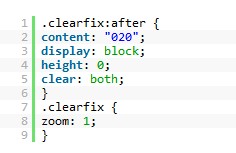
原理解析
::before修正margin-top塌陷(現代瀏覽器)。::after+clear:both清除浮動,撐開父層高度。*zoom:1觸發 IE6/7hasLayout,達到同樣清除效果。
其他常見清除浮動方法比較
| 方法 | 優點 | 缺點 |
|---|---|---|
額外空 <div style="clear:both"></div> | 簡單直觀 | 污染 HTML 結構、無語意 |
父層 overflow:hidden/auto | 無額外標籤 | 可能裁切陰影/絕對定位子元素、觸發滾動條 |
父層 display:flow-root | 現代標準、語意清晰 | IE/Edge 舊版不支援 |
父層 float:left/right | 自動包含浮動子元素 | 父層本身脫離文件流,影響佈局 |
最佳實踐建議
- 專案統一採用
.clearfix類別,語意明確、可複用。 - 現代專案(不支援 IE)直接用
display: flow-root。 - 避免濫用
overflow:hidden清除浮動,防止副作用(參見 overflow 陷阱)。
- 上一篇程序編程: CSS 自訂文字選取反白顏色:::selection 偽元素跨瀏覽器寫法
- 下一篇程序編程: CSS 讓圖片在 DIV 中水平垂直雙向置中完整解法
推薦文章
- CSS ID 與 Class 選擇器深度解析:命名規範、優先級、複用策略與常見錯…
- CSS 模組化分塊寫法:區塊註解、元件封裝與 BEM 架構實戰
- 深入理解 CSS background-position 定位邏輯
- IE6 圖片底部間隙 Bug:成因分析與五大解決方案
- CSS 屬性字母序排序:為什麼它是團隊協作的最優解?
- 網頁虛線實現三大方案:CSS Border、背景模擬與圖片填充對比
- CSS 掛馬攻擊原理與防範:從 Web 2.0 互動機制談資安防護
- 原生 JavaScript 實現無縫向上循環滾動 (Marquee) 完整代碼
- CSS Hack 完全指南:針對 IE6/7/8、Firefox 的選擇器與屬性…
- CSS 實現段落首行縮進兩個字元
copyright © 萬盛學電腦網 all rights reserved