您现在的位置: 萬盛學電腦網 >> 程式設計 > >> 網頁製作 >> HTML5 教學
HTML5 Canvas 入門教程:從零繪製一個笑臉,理解 DOM、Canvas 與 JavaScript 協作機制
前言:Canvas 是什麼?
<canvas> 是 HTML5 新增的**位圖繪圖面板**,本身無繪圖能力,必須通過 JavaScript 獲取其「繪圖上下文」調用 API 繪製。理解三者關係:
- HTML:提供
<canvas id="c" width="640" height="480">容器; - DOM:
document.getElementById('c')獲取元素節點; - JavaScript:
canvas.getContext('2d')獲取繪圖上下文,調用fillRect、arc等方法繪圖。
步驟 1:準備 HTML 骨架
<!DOCTYPE html>
<html><body>
  <canvas id="canvas" width="640" height="480">
    您的瀏覽器不支持 Canvas,請升級。
  </canvas>
  <script src="script.js"></script>
</body></html>
步驟 2:獲取上下文並設置顏色
// script.js
const canvas = document.getElementById('canvas');
const ctx = canvas.getContext('2d');

// 設置畫筆(描邊)與填充顏色
ctx.strokeStyle = 'black'; // 畫筆顏色
ctx.fillStyle = 'yellow';  // 填充顏色
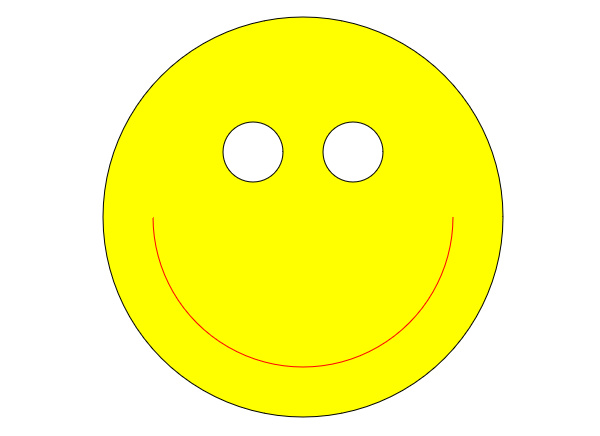
步驟 3:繪製臉部(圓形)
Canvas 無直接畫圓方法,使用路徑構建:
ctx.beginPath();                          // 開始新路徑
ctx.arc(320, 240, 200, 0, Math.PI * 2);  // 圓心(320,240),半徑200,0到2π完整圓弧
ctx.fill();                               // 填充內部
ctx.stroke();                             // 描邊
ctx.closePath();                          // 關閉路徑(良好習慣)
arc(x, y, radius, startAngle, endAngle) 角度單位為**弧度**,Math.PI * 2 = 360°。
步驟 4:繪製眼睛(白色填充圓)
ctx.fillStyle = 'white'; // 切換填充色

// 左眼
ctx.beginPath();
ctx.arc(270, 175, 30, 0, Math.PI * 2);
ctx.fill();
ctx.stroke();
ctx.closePath();

// 右眼
ctx.beginPath();
ctx.arc(370, 175, 30, 0, Math.PI * 2);
ctx.fill();
ctx.stroke();
ctx.closePath();
步驟 5:繪製嘴巴(半圓弧)
ctx.fillStyle = 'red'; // 嘴巴填充紅色

ctx.beginPath();
// 圓心(320,240),半徑150,從0到-π(順時針繪製上半圓弧)
ctx.arc(320, 240, 150, 0, -Math.PI);
ctx.fill();
ctx.stroke();
ctx.closePath();
完整代碼整合
const canvas = document.getElementById('canvas');
const ctx = canvas.getContext('2d');

ctx.strokeStyle = 'black';

// 臉
ctx.fillStyle = 'yellow';
ctx.beginPath();
ctx.arc(320, 240, 200, 0, Math.PI * 2);
ctx.fill(); ctx.stroke(); ctx.closePath();

// 眼睛
ctx.fillStyle = 'white';
[270, 370].forEach(x => {
  ctx.beginPath();
  ctx.arc(x, 175, 30, 0, Math.PI * 2);
  ctx.fill(); ctx.stroke(); ctx.closePath();
});

// 嘴
ctx.fillStyle = 'red';
ctx.beginPath();
ctx.arc(320, 240, 150, 0, -Math.PI);
ctx.fill(); ctx.stroke(); ctx.closePath();
進階練習建議
- 添加眉毛、鼻子、腮紅,豐富表情;
- 用
requestAnimationFrame實現眨眼、嘴巴張合動畫; - 滑鼠移入時眼睛跟隨滑鼠轉動(
Math.atan2計算角度); - 嘗試
ctx.quadraticCurveTo繪製貝茲曲線嘴巴,表現更多情緒。
核心知識點回顧
| 概念 | 關鍵點 |
|---|---|
| Canvas 元素 | 僅是容器,需指定 width/height 屬性(非 CSS),否則默認 300×150 並被拉伸模糊 |
| 繪圖上下文 | getContext('2d') 返回 CanvasRenderingContext2D,包含所有繪圖方法 |
| 路徑 | beginPath → 繪製指令 → fill/stroke → closePath,狀態機模式 |
| 顏色狀態 | fillStyle/strokeStyle 為上下文屬性,修改後對後續繪製生效 |
| 坐標系 | 原點(0,0)在左上角,X 右正,Y 下正,單位像素 |
恭喜!你已完成第一個 Canvas 繪圖程序。這個笑臉雖簡單,但蘊含了「聲明式 HTML 容器 + 命令式 JS 繪圖」的核心範式。繼續探索 drawImage、getImageData、變換矩陣、動畫循環,解鎖 Canvas 的無限可能。
- 上一篇程序編程: HTML5 Notification API 實戰:構建桌面級 Web 通知系統完整指南
- 下一篇程序編程: 玩轉 HTML5 移動頁面動效篇:六大技巧打造極致視覺體驗
推薦文章
- HTML 表格邊框樣式詳解:cellpadding 與 cellspacing …
- HTML 標籤大全:從基礎結構到表單、表格、框架的完整分類速查
- HTML5 移動應用開發實戰(五):Canvas 繪圖與 CSS3 視覺新特性
- 2014 年爆紅 H5 案例深度解析:四大類型、四種表現形式與設計加分關鍵
- 掌握 HTML 的 7 大實戰優勢:從 SEO 到全端開發的基石
- HTML 頁面核心標籤速查:結構、語義、常用屬性一覽
- HTML 註釋語法完全指南:單行、多行、條件註釋、工具生成與最佳實踐
- HTML <fieldset> <legend> 表單分組與視覺框架效果實作
- HTML5 新增常用標籤速查:語意化、多媒體、表單與互動元素
- HTML <input> 標籤完整指南:type 類型、屬性、驗證與無障礙實踐
copyright © 萬盛學電腦網 all rights reserved