您现在的位置: 萬盛學電腦網 >> 作業系統 > >> Windows 10 資訊
Win10 9860 調整預覽版更新頻率:Fast(快)嘗鮮 vs Slow(慢)求穩
Build 9860 引入更新頻率選擇,位於「設定」→「更新與復原」→「預覽版本」:
- Fast(快):優先推送最新建置,功能最新但 Bug 多,適合極客/測試員。
- Slow(慢):經 Fast 環測試後推送,穩定度較高,適合追求穩定的 Insider 會員。

微軟內部更新模型(由內而外穩定度遞增):
- Canary(每日建置)
- OSG(作業系統群組)
- Microsoft 內部
- Windows Insiders Fast
- Windows Insiders Slow
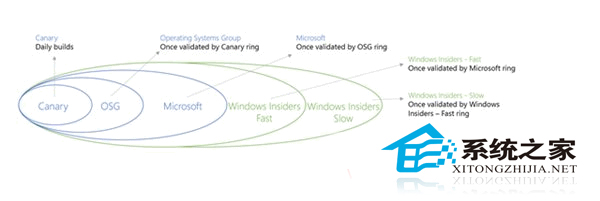
依自身需求選擇:想搶鮮功能選 Fast,要穩定選 Slow。
推薦文章
- Windows 10 「儲存空間」建立教學:多硬碟組合資料保護、容錯與擴充
- Windows 10 「此電腦」圖示放到桌面三種方法
- Windows 10 關閉系統聲音/關機音效/通知音效完整設定
- Win10 網路圖示出現黃色驚嘆號?修改登錄隱藏 NCSI 檢測圖示
- 升級 Win10 後悔了?31 天內一鍵降級回 Win7/8.1,別刪 Wind…
- Windows 10 系統啟用完整教學:金鑰獲取、安裝中啟用、安裝後變更金鑰
- Windows 10 移除 Internet Explorer 11 完整教學與…
- Win10 重新開機/關機完整操作指南:兩種方法(開始選單 / 快捷鍵)
- Windows 10/8.1 開始選單/工作列托盤圖示錯誤 TrayItem.{…
- Windows 10 任務列時鐘顯示星期幾:自訂短日期格式加入 dddd
copyright © 萬盛學電腦網 all rights reserved