您现在的位置: 萬盛學電腦網 >> 程式設計 > >> 網頁製作 >> Div CSS 教學
CSS 實現大背景網頁自適應:圖片+背景色、雙層背景圖技巧
大螢幕下背景圖不夠寬/高導致邊緣露白,兩大經典技巧完美解決:
技巧一:圖片邊緣純色 + body 背景色同色
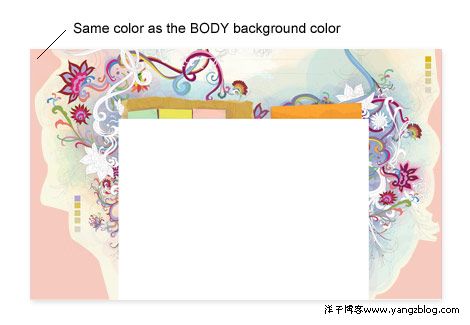
body {
  margin: 0; padding: 0;
  background: #f8f7e5 url(wdw-bg.jpg) no-repeat center top;
  width: 100%; display: table; /* 修正舊 IE 高度塌陷 */
}
圖片邊緣為純色 #f8f7e5,超出圖片範圍自動顯示 body 背景色,無縫銜接。
技巧二:雙層背景圖(body 重複紋理 + wrapper 主視覺)
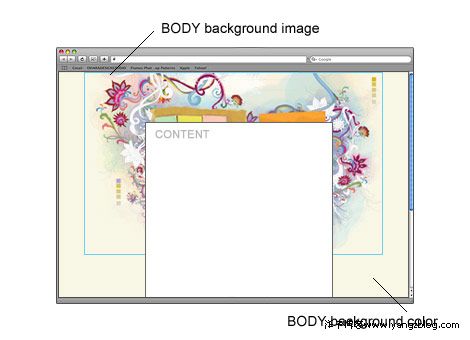
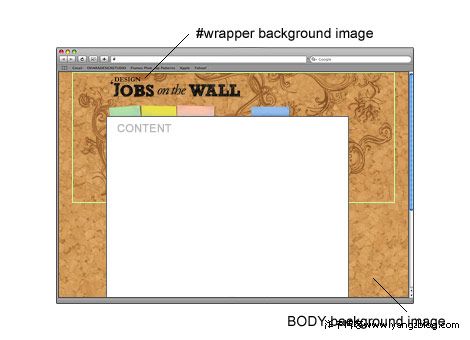
body {
  background: url(cork-pattern.gif) repeat; /* 輕量可平鋪紋理 */
}
#wrapper {
  background: url(main-visual.jpg) no-repeat center top;
  min-height: 100vh; /* 確保至少一屏高 */
}
關鍵:主視覺圖邊緣顏色與紋理主色調接近(稍深),視覺自然過渡。
現代最佳實踐:CSS3 多重背景
body {
  background:
    url(main-visual.jpg) no-repeat center top,
    url(cork-pattern.gif) repeat;
  background-color: #f8f7e5; /* 終極兜底色 */
}
單一元素、無額外 wrapper、支援所有現代瀏覽器(IE9+),為當前首選方案。
- 上一篇程序編程: CSS cursor 滑鼠游標完整可選值速查表(含自定義圖標)
- 下一篇程序編程: CSS3 3D 翻轉卡片效果:hover 觸發 Y 軸 180° 旋轉
推薦文章
- 瀏覽器 CSS Hack 完整速查表:Firefox、WebKit、Opera、…
- 三欄式液態佈局實作:經典 Float+Clear 技法與現代 Flexbox/G…
- CSS 偽元素 ::before 與 ::after 進階實戰:從清除浮動到純 …
- CSS 斷行與不換行完整指南:white-space、word-break、wo…
- Dreamweaver CSS 版面配置實戰:選擇器類型、層疊機制與最佳實踐
- CSS 學習瓶頸突破指南:從廣度走向深度,改變視角掌握核心機制
- CSS3 三大視覺利器:Border-radius 圓角、Box-shadow …
- CSS 高效能寫法四大黃金法則:少層級、用 Class、避免標籤綁定、善用繼承
- 免費自助裝修網店常用代碼大全:圖片、音樂、浮動、跑馬燈、連結
- CSS 掛馬攻擊原理與防範:從 Web 2.0 互動機制談資安防護
copyright © 萬盛學電腦網 all rights reserved