您现在的位置: 萬盛學電腦網 >> 程式設計 > >> 網頁製作 >> HTML5 教學
HTML5 Canvas 繪製鋸齒邊框效果完整範例
效果展示
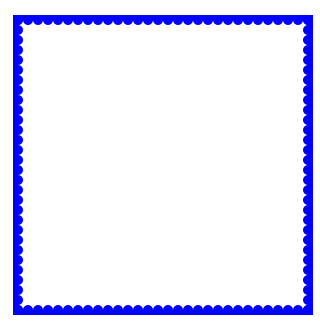
完整程式碼
將以下代碼存為 .html 直接用瀏覽器開啟即可看到動態鋸齒邊框。
<!doctype html>
<html lang="zh">
<head>
<meta charset="gbk">
<title>鋸齒圖</title>
<script>
window.addEventListener("load", eventWindowLoaded, false);
function eventWindowLoaded(){
  var x, y;
  var theCanvas = document.getElementById("canvas");
  var context = theCanvas.getContext("2d");

  // 外框
  context.strokeStyle = '#00f';
  context.lineWidth = 10;
  context.strokeRect(0, 0, theCanvas.width, theCanvas.height);

  context.fillStyle = "#00f";
  // 上下邊鋸齒
  for(x=5; x<=theCanvas.width; x+=10){
    context.beginPath();
    context.arc(x, 5, 5, 0, Math.PI, false);           // 上半圓
    context.closePath(); context.fill();
    context.beginPath();
    context.arc(x, theCanvas.height-5, 5, 0, Math.PI, true); // 下半圓
    context.closePath(); context.fill();
  }
  // 左右邊鋸齒
  for(y=5; y<=theCanvas.height; y+=10){
    context.beginPath();
    context.arc(5, y, 5, 0, Math.PI*2, true);           // 左全圓
    context.arc(theCanvas.width-5, y, 5, 0, Math.PI*2, true); // 右全圓
    context.closePath(); context.fill();
  }
}
</script>
</head>
<body>
<div style="position: absolute; top: 100px; left: 100px;">
<canvas id="canvas" width="300" height="300"></canvas>
</div>
</body>
</html>
核心邏輯解析
- 外框:
strokeRect畫出 10px 藍色邊框。 - 上下鋸齒:每 10px 畫一個半徑 5px 的半圓,上邊用
false(順時針)畫上半圓,下邊用true(逆時針)畫下半圓。 - 左右鋸齒:每 10px 在左、右邊界各畫一個完整圓(
0 到 2π)。 - 填滿色:皆用
fillStyle = "#00f"統一藍色,形成連續鋸齒視覺。
擴充建議
- 將間距、半徑、顏色抽離為參數,封裝成
drawJaggedBorder(canvas, options)可複用函式。 - 搭配
requestAnimationFrame讓鋸齒旋轉或脈動,增加動態感。 - 改用
Path2D離屏建立路徑,再fill,效能更佳。
- 上一篇程序編程: HTML5 Canvas 太極旋轉動畫:兩種實作方式完整解析
- 下一篇程序編程: HTML5 Canvas 繪製玫瑰曲線與心形圖案完整代碼範例
推薦文章
- jQuery Mobile 頁面切換與模態框完全指南:data-* 屬性驅動的原…
- HTML <div> 背景顏色設定完整教學:CSS background 屬性深…
- HTML 標籤分類圖鑑:區塊/行內/可變元素、HTML5 內容模型、CSS di…
- 美妝 H5 案例精選:6 招擊中女性消費者的心
- HTML 表格邊框樣式現代化:border-collapse、邊框合併、圓角、陰…
- 純 HTML5/CSS3 打造滑鼠滾輪切換的簡易幻燈片
- Oracle 匯入/匯出工具 使用詳解:exp/imp 參數、模式與常見問題
- HTML 表格固定寬度與內容截斷:table-layout、overflow 與…
- HTML 顏色代碼大全:16 進位色碼表、命名色彩與現代色彩系統建議
- HTML 表格跨列合併(colspan)完整教學:語法、實戰場景與無障礙注意事項
copyright © 萬盛學電腦網 all rights reserved