您现在的位置: 萬盛學電腦網 >> 作業系統 > >> Linux 教學
CentOS 開機 GRUB 引導錯誤修復:光盤救援模式與 U 盤安裝殘留問題完整解決方案
CentOS 開機出現 GRUB、grub> 提示或錯誤代碼,通常因 MBR 損壞、分區變動、核心更新失敗或 U 盤安裝導致裝置映射錯誤。本文提供兩套完整修復方案:光盤救援模式重裝 GRUB、手動編輯 grub.conf 修正配置、U 盤安裝殘留裝置映射修正。
一、方案 A:光盤救援模式修復(標準流程)
- 插入 版本相同 的 CentOS 安裝光盤,啟動進入選單
- 選擇 Troubleshooting / Rescue a CentOS system 或按 F5 輸入
linux rescue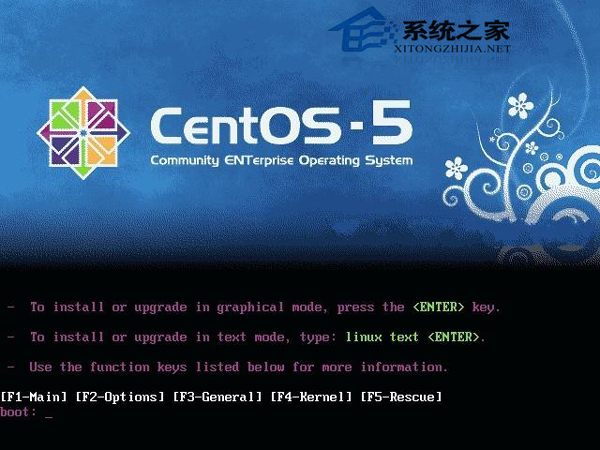

- 語言/鍵盤選擇預設,選 Continue 掛載系統映像至
/mnt/sysimage
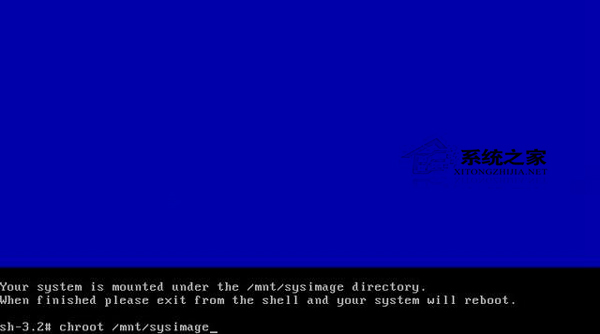
- 切換根環境並重裝 GRUB
# chroot /mnt/sysimage
# grub
grub> root (hd0,0)
grub> setup (hd0)
grub> quit
# reboot

二、方案 B:手動修復 grub.conf(若方案 A 無效)
在 chroot /mnt/sysimage 後:
# vi /boot/grub/grub.conf
# 補全最小可用配置(以 CentOS 5.9 為例)
# grub.conf generated by anaconda
default=0
timeout=5
splashimage=(hd0,0)/grub/splash.xpm.gz
hiddenmenu
title CentOS (2.6.18-348.el5)
    root (hd0,0)
    kernel /vmlinuz-2.6.18-348.el5 ro root=LABEL=/
    initrd /initrd-2.6.18-348.el5.img
# :wq! 強制存檔
# quit
# reboot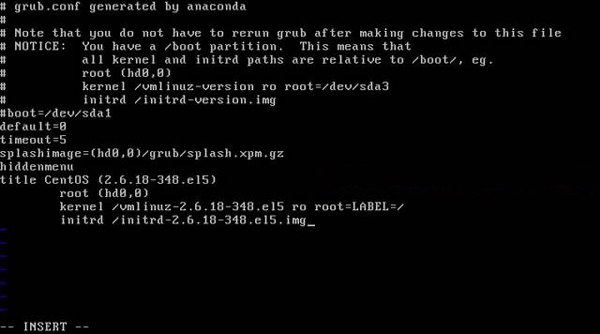
三、方案 C:U 盤安裝導致的裝置映射錯誤修復
現象:拔掉 U 盤無法開機,插上 U 盤正常啟動。
原因:安裝時 U 盤被識別為 sdb,硬碟為 sda,GRUB 安裝到 U 盤 MBR,device.map 與 grub.conf 記錄錯誤映射。
修復步驟(已能進入系統前提)
# 1. 重裝 GRUB 到硬碟 MBR
# grub-install /dev/sda

# 2. 修正 device.map
# vi /boot/grub/device.map
# 修正為:
(hd0) /dev/sda
# 刪除錯誤的 (hd1) /dev/sda 等行

# 3. 修正 grub.conf 中的 root 裝置
# vi /boot/grub/grub.conf
# 將所有 (hd1,0) 改為 (hd0,0)
# 僅保留當前核心啟動項,刪除多餘舊項

# 4. 重啟驗證(拔掉 U 盤)
# reboot
四、預防建議
- 安裝時拔除非必要 USB 裝置
- 使用
grub2-install /dev/sda(CentOS 7) 或grub-install /dev/sda(CentOS 6) 明確指定安裝目標 - 定期備份
/boot/grub/grub.conf與/boot/grub/device.map
推薦文章
- Linux 網路 IP 設定四大法:ifconfig、neat、netconfi…
- Linux 系統管理 8 大實用技巧:特殊檔名、快速關機、Tab 補全、滑鼠複製…
- Linux 判斷上次關機是否正常:開機建標記、關機刪標記、Runlevel 腳本…
- Ubuntu 禁用關機/重啟/登出確認對話框:gsettings 一鍵關閉與恢復
- 學習 Linux 指令的四大實戰技巧:每日提示、whatis 即時查詢、man/…
- Linux 系統安全加固實戰(二):Telnet 資訊隱藏與預設特權帳號清理
- VMware Workstation 中 CentOS 6.5 NAT 模式網路…
- Ubuntu 12.04 開機卡在 Checking Battery State…
- initrd 與 initramfs 根本差異:ramdisk vs rootf…
- Linux 環境下 Oracle 資料庫監控利器:11 大系統層級工具實戰解析
copyright © 萬盛學電腦網 all rights reserved