您现在的位置: 萬盛學電腦網 >> 作業系統 > >> Windows 7 教學
XP 「我的電腦」雙擊無法開啟?註冊表清理 Autorun 病毒修復法
XP 系統下「我的電腦」雙擊無反應、無法開啟,常因 MountPoints2 註冊表項殘留 command 子項,或磁碟根目錄存在 autorun.inf 病毒檔案導致。提供註冊表清理與命令列刪毒雙重修復法。
修復步驟
- Win+R 輸入
regedit開啟登錄編輯器。 - 依序展開:
HKEY_CURRENT_USER → Software → Microsoft → Windows → MountPoints2 - 檢查所有子項,若含
command子項 → 全部刪除。 - Win+R 輸入
cmd開啟命令提示字元。 - 輸入盤符切換(如
d:)→ Enter。 - 輸入
dir autorun.inf /a查找隱藏系統檔。 - 若找到,依序執行:
attrib autorun.inf -s -h -r(移除屬性)del autorun.inf(刪除檔案) - 重啟電腦,「我的電腦」雙擊即可正常開啟。
圖文示範
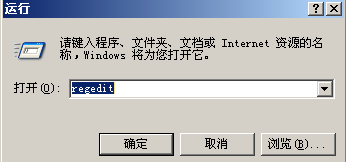
按步驟操作,徹底修復雙擊無反應問題,預防病毒傳播。
- 上一篇操作系統: 索尼筆記本 Win7 正版 64位 系統:正版基礎精簡優化,穩定兼容強,支援在線更新
- 下一篇操作系統: 筆記本經常卡頓、死機?軟硬體全方位排查與解決方案
推薦文章
- Windows 7 藍畫面 Win32k.sys 錯誤完整排查指南
- SolidWorks 軟體運行緩慢卡頓的解決對策
- Windows 7 雙網卡內外網衝突解決:單一預設閘道 + 靜態路由
- Win7 電腦無法開啟攝影機功能完整排解 (含圖文詳解)
- Win7 桌面匯率換算小工具設定教學:多幣別即時顯示、視窗透明化、拖曳排序
- Word 2013 英文發音與翻譯功能完整使用教學
- Win7 快速開啟「網路連線」三大技巧:ncpa.cpl、CMD、控制台
- Windows 7 隱私保護:快速清除文件開啟記錄與跳躍清單
- 解決 Win7 桌面圖示僅顯示名稱、圖示消失的問題
- Win7 外接螢幕擴充桌面:Win+P 快速切換雙螢幕模式
copyright © 萬盛學電腦網 all rights reserved