您现在的位置: 萬盛學電腦網 >> 程式設計 > >> 腳本程式專題 >> JavaScript
原生 JavaScript 打造 HTML5 視頻播放器
從 Flash 到 HTML5
早年網頁視頻播放非 Flash 莫屬,但隨著行動裝置普及與 HTML5 標準成熟,<video> 元素已成為主流。原生播放器無需外掛、跨平台一致、可深度定製 UI,是現代 Web 開發的必備技能。
效果截圖

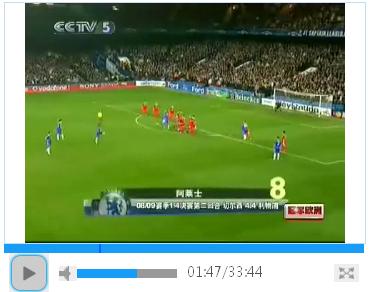
核心功能模組
| 模組 | 對應 API / 邏輯 |
|---|---|
| 播放/暫停 | video.play() / pause()、切換按鈕樣式 |
| 進度條拖曳 | video.currentTime = 比例 * duration、timeupdate 同步 UI |
| 音量控制 | video.volume (0-1)、靜音切換、音量條拖曳 |
| 全螢幕 | 標準 requestFullscreen + 廠商前綴、fullscreenchange 監聽退出 |
| 時間顯示 | loadedmetadata 取總長、timeupdate 更新當前時間、格式化 mm:ss |
| 緩衝顯示 | video.buffered 區間、定時器更新緩衝條寬度 |
| 控制列自動隱藏 | 全螢幕下 mousemove 重置計時器、5 秒無操作淡出 |
關鍵代碼片段
時間格式化
function formatTime(seconds) {
  seconds = Math.round(seconds);
  var minutes = Math.floor(seconds / 60);
  seconds = Math.floor(seconds % 60);
  return (minutes >= 10 ? minutes : '0' + minutes) + ':' +
         (seconds >= 10 ? seconds : '0' + seconds);
}
進度條點擊跳轉
avalon.bind($('video_bar'), 'click', function(e) {
  var ratio = (e.clientX - $('video_bar').offsetLeft) / $('video_bar').offsetWidth;
  $('html5_video').currentTime = ratio.toFixed(2) * $('html5_video').duration;
});
全螢幕切換(跨瀏覽器)
function toggle_fullscreen() {
  $('html5_video').className = 'video_fs';
  fs = true;
  $('video_control').className = 'fullscreen';
  var elem = $('html5_video');
  if (elem.msRequestFullscreen) elem.msRequestFullscreen();
  else if (elem.mozRequestFullScreen) elem.mozRequestFullScreen();
  else if (elem.webkitRequestFullscreen) elem.webkitRequestFullscreen();
}

function exit_fullscreen() {
  $('html5_video').className = '';
  fs = false;
  active = false;
  $('video_control').className = '';
  if (document.exitFullscreen) document.exitFullscreen();
  else if (document.webkitCancelFullScreen) document.webkitCancelFullScreen();
  else if (document.mozCancelFullScreen) document.mozCancelFullScreen();
}

// 監聽瀏覽器原生退出全螢幕(Esc 鍵、UI 按鈕)
document.onmozfullscreenchange = document.onwebkitfullscreenchange = function() {
  if ($('html5_video').clientWidth !== document.documentElement.clientWidth) {
    exit_fullscreen();
  }
};
緩衝進度顯示
function updateBuffered() {
  var v = $('html5_video'), r = v.buffered;
  if (r && r.length) {
    var end = r.end(r.length - 1); // 取最後一段緩衝結束點
    $('video_buffer_bar').style.width = (end / v.duration * 100) + '%';
  }
}
setInterval(updateBuffered, 500);
HTML 結構骨架
<video id="html5_video" src="video.mp4"></video>
<div id="video_control">
  <button id="control_btn" class="html5_video_play_btn"></button>
  <div id="video_bar"><div id="video_progress_bar"></div></div>
  <span id="html5_play_time">00:00</span> / <span id="html5_video_duration">00:00</span>
  <div id="vol_bar"><div id="vol_value"></div></div>
  <button id="mute_icon" class="html5_video_mute"></button>
  <button id="html5_video_fullscreen"></button>
</div>
常見坑點與解決
- 行動端自動播放限制:需在使用者手勢事件(click/touchend)中呼叫
play(),或加muted屬性配合playsinline - 全螢幕樣式隔離:
:fullscreen偽類支援度不一,建議用 JS 切換 class 控制 - 影片格式相容:提供 MP4 (H.264) + WebM (VP9) 双源,覆蓋主流瀏覽器
- 直播流支援:HLS (.m3u8) 需引入 hls.js,DASH 需 dash.js
擴展建議
- 鍵盤快捷鍵:Space 播放/暫停、←/→ 快退/快進、↑/↓ 音量、F 全螢幕
- 畫中畫 (PiP):
video.requestPictureInPicture() - 倍速播放:
video.playbackRate = 1.5 - 字幕軌道:
<track kind="subtitles">+ WebVTT - 截圖/錄製:
canvas.drawImage(video)+ MediaRecorder API
總結
HTML5 原生 <video> API 功能完整,配合模組化的 UI 邏輯,即可打造媲美商業播放器的體驗。本文示範的代碼結構清晰、無外部依賴,適合作為專案播放器的基礎骨架再行擴展。
- 上一篇程序編程: AvalonJS 打造響應式瀑布流圖片牆
- 下一篇程序編程: 原生 JavaScript 實現四級左側導航選單
推薦文章
- JavaScript 子視窗與父視窗雙向傳值完整範例 (showModalDia…
- jQuery 滑動導航菜單插件:TagDrop 效果實現與配置詳解
- JavaScript 取得頁面表單數量:document.forms.lengt…
- JavaScript 即時顯示伺服器同步日期時間完整範例
- jQuery AJAX 非同步賦值全域變數失效:根因分析與 async/awai…
- jQuery Uploadify 在 Firefox 中失效的解決方案:補全 J…
- JS 監聽頁面滾動實現「返回頂部」按鈕顯隱
- 左側固定表頭 JS 表格元件:支援多行表頭、多欄位、固定列、自適應寬度、資料獲取
- 淺析 JavaScript DOM:核心概念、節點操作、樣式控制與表單處理
- 原生 JavaScript 實現可拖拽、遮罩層、居中顯示的 DIV 彈出層組件
copyright © 萬盛學電腦網 all rights reserved