您现在的位置: 萬盛學電腦網 >> 程式設計 > >> 網頁製作 >> Div CSS 教學
CSS line-height 進階技巧:多行著色、底線網格、圖文對齊
基礎回顧
line-height: normal |  |  |  | inherit
初始值: normal (約 1.2) | 繼承: 是 | 適用: 所有元素
推薦使用無單位數值 (如 1.4),表示與 font-size 的倍數關係,繼承時按比例計算,避免固定像素值導致的行高異常。
技巧一:為每行文本指定不同顏色
無 ::nth-line 選擇器,利用背景漸變模擬:
.text {
  -webkit-background-clip: text;
  -webkit-text-fill-color: transparent;
  background-image: linear-gradient(
    to bottom,
    #9588DD, #9588DD 22px,   /* 第1行 */
    #DD88C8, #DD88C8 44px,   /* 第2行 */
    #D3DD88, #D3DD88 66px,   /* 第3行 */
    #88B0DD, #88B0DD         /* 第4行 */
  );
  line-height: 22px; /* 必須固定值配合色標位置 */
}
SCSS 變量化:
$lh: 1.4em;
@supports (-webkit-background-clip: text) {
  p {
    -webkit-background-clip: text;
    -webkit-text-fill-color: transparent;
    background-image: linear-gradient(
      to bottom,
      #9588DD, #9588DD #{$lh},
      #DD88C8 #{$lh}, #DD88C8 #{$lh*2},
      #D3DD88 #{$lh*2}, #D3DD88 #{$lh*3},
      #88B0DD #{$lh*3}, #88B0DD
    );
  }
}

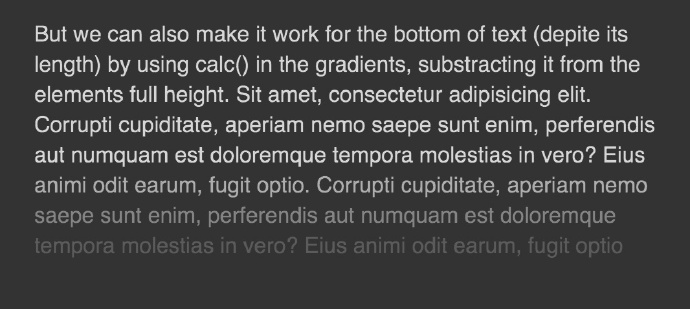
從底部向上著色
配合 calc() 和 background-position: bottom center:
.text {
  background-image: linear-gradient(
    to bottom,
    rgba(white,0.8), rgba(white,0.8) calc(100% - 66px),
    rgba(white,0.6) calc(100% - 66px), rgba(white,0.6) calc(100% - 44px),
    rgba(white,0.4) calc(100% - 44px), rgba(white,0.4) calc(100% - 22px),
    rgba(white,0.2) calc(100% - 22px), rgba(white,0.2)
  );
  background-position: bottom center;
}
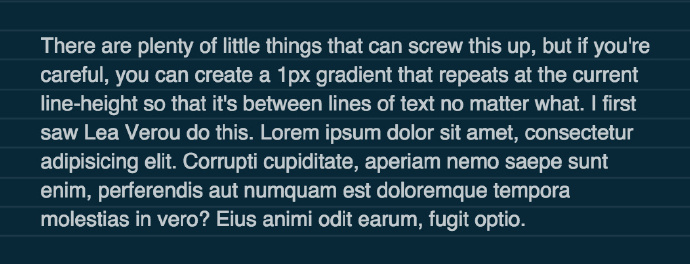
技巧二:文字間的橫線網格 (筆記本效果)
.parent {
  padding: $lh*2;
  background: #082838;
  background-image: repeating-linear-gradient(
    to bottom,
    rgba(white,0) 0,
    rgba(white,0) #{$lh/1em*16px - 1},
    rgba(white,0.1) #{$lh/1em*16px - 1},
    rgba(white,0.1) #{$lh/1em*16px}
  );
}原理:repeating-linear-gradient 每 line-height 重複,留 1px 顯色形成細線。padding 同步基於 line-height 保證對齊。
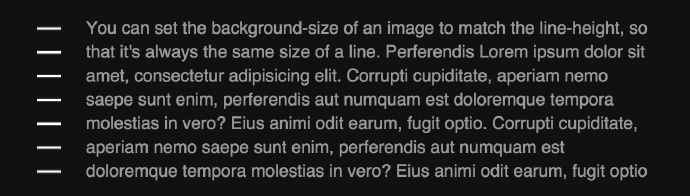
技巧三:每行一圖標 (背景圖垂直重複)
.text {
  background-image: url(icon.svg);
  background-size: $lh $lh;  /* 寬高同 line-height */
  background-repeat: repeat-y;
  padding-left: $lh*2;       /* 留出圖標空間 */
}
兼容性提示
background-clip: text:WebKit/Blink 內核支援,Firefox 需layout.css.background-clip-text.enabled- 無支援時降級:顯示色帶背景,視覺仍可接受
- 使用
@supports封裝增強樣式
- 上一篇程序編程: CSS3 background-attachment 實現滾動視差效果教程
- 下一篇程序編程: CSS3 opacity 透明度屬性完整指南與 RGBA 對比
推薦文章
- CSS 常用屬性速查手冊:色彩背景、字體文本、盒模型、佈局、列表、邊框、視覺效果…
- DIV 底部固定背景圖片:background-position 精準控制與固定…
- 語義化 ul 多欄佈局:用列表語義替代無意義 div 嵌套的實戰探索
- DIV+CSS 模板設計:從表格佈局到語意化結構的演進與 SEO 優勢
- CSS3 圖片旋轉動畫特效:360度、60度、-360度完整實作
- Dreamweaver 實用技巧 13 選:空格輸入、Favicon、響應式表格…
- IE6 :hover 失效解決:a 標籤必須有 href 屬性
- CSS clip 屬性深度解析:搭配 absolute 定位實現元素裁切與可視區…
- CSS 命名規範實戰指南:模組前綴、類型、狀態、位置的結構化命名法
- CSS 響應式設計三步走:Meta 標籤、流體佈局、媒體查詢實戰
copyright © 萬盛學電腦網 all rights reserved