您现在的位置: 萬盛學電腦網 >> 程式設計 > >> 網頁製作 >> Div CSS 教學
HTML map 標籤實現單圖多熱區點擊:座標獲取與區域形狀完整指南
圖像映射基礎
<map> 定義客戶端圖像映射,<area> 嵌套其中定義可點擊區域。<img> 用 usemap="#map名稱" 關聯,<map> 需同時設定 id 與 name 以相容各瀏覽器。
實戰範例:九宮格熱區
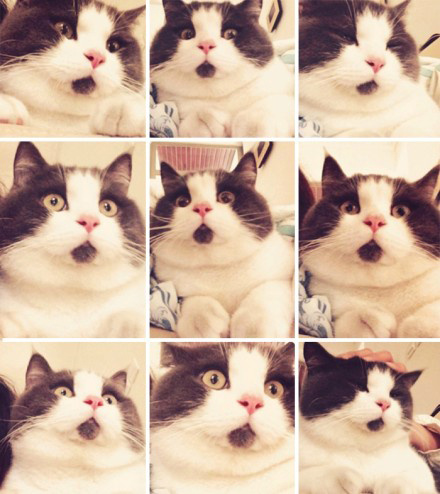
目標圖片:
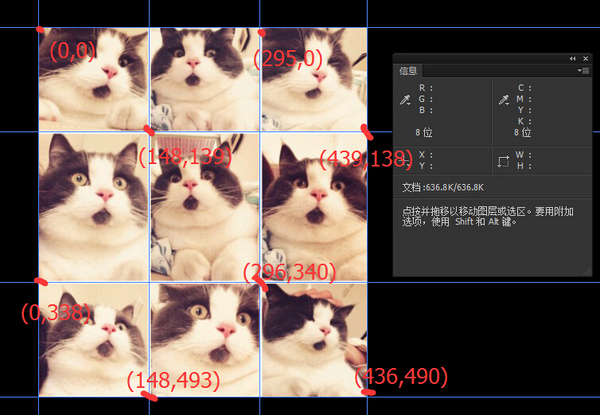
用 PS 取得座標:
完整 HTML 代碼
<!DOCTYPE html>
<html lang="en">
<head>
  <meta charset="UTF-8">
  <title>Document</title>
</head>
<body>
  <img src="cat.jpg" alt="" usemap="#catmap">
  <map name="catmap">
    <area shape="rect" coords="0,0,148,139" href="https://www.baidu.com" target="_blank" alt="">
    <area shape="rect" coords="148,139,295,0" href="https://www.sina.com" target="_blank" alt="">
    <area shape="rect" coords="295,0,439,140" href="https://www.qq.com" target="_blank" alt="">
    <area shape="rect" coords="148,139,0,340" href="https://www.163.com" target="_blank" alt="">
    <area shape="rect" coords="148,139,296,340" href="https://www.soso.com" target="_blank" alt="">
    <area shape="rect" coords="296,340,439,140" href="https://sf.gg" target="_blank" alt="">
    <area shape="rect" coords="0,340,148,493" href="https://www.zhihu.com" target="_blank" alt="">
    <area shape="rect" coords="148,493,296,340" href="https://z.cn" target="_blank" alt="">
    <area shape="rect" coords="296,340,436,490" href="https://jd.com" target="_blank" alt="">
  </map>
</body>
</html>
area 三種形狀與座標格式
| 形狀 | shape 值 | coords 格式 | 說明 |
|---|---|---|---|
| 圓形 | circle | x,y,r | 圓心 (x,y),半徑 r |
| 多邊形 | polygon / poly | x1,y1,x2,y2,x3,y3... | 每組座標為一頂點,三角形至少 3 組 |
| 矩形 | rectangle / rect | x1,y1,x2,y2 | 對角兩頂點座標,(0,0) 為圖片左上角 |
矩形實質是四頂點多邊形的簡寫,只需對角兩點即可。
- 上一篇程序編程: CSS 背景屬性全解析:從基礎到多重背景與漸變
- 下一篇程序編程: CSS 規則聲明深度解析:屬性值三大類(關鍵字、數值、顏色)完整指南
推薦文章
copyright © 萬盛學電腦網 all rights reserved