您现在的位置: 萬盛學電腦網 >> 作業系統 > >> Windows XP 教學
WinXP 移除 Windows Search(Windows 桌面搜尋)四種方法:控制台移除、命令列卸載、登錄表查找卸載字串、補全卸載檔案重試
Windows XP 安裝 Windows Search(Windows Desktop Search 3.0/4.0)後,原本的「搜尋小精靈」被取代,許多用戶習慣舊版介面想移除。但「新增/移除程式」中常找不到項目,或卸載報錯。提供四種由易到難的完整移除方案。
方法一:確認版本並嘗試控制台移除
- 開啟 Windows Search,看右上角標題:
「Windows Desktop Search」= 第 3 版(WDS 3.0)
「Windows Search」= 第 4 版(WDS 4.0) - 「控制台」→「新增移除程式」→ 找「Windows Desktop Search」→「移除」。若不存在進入方法二。

圖示:判斷 Windows Search 版本

圖示:新增移除程式中尋找
方法二:命令列直接呼叫卸載程式
- Win+R → 輸入:
%systemroot%\$NtUninstallKB940157$\spuninst\spuninst.exe→「確定」。 - 按提示完成卸載。

圖示:執行卸載命令
方法三:登錄表查找真實卸載字串
- 若方法二提示「系統找不到指定路徑」,開啟
regedit。 - 展開:
HKEY_LOCAL_MACHINE\Software\Microsoft\Windows\CurrentVersion\Uninstall,或用「編輯」→「尋找」→「Windows Search」定位。 - 找到對應項目,右側找
UninstallString字串值,雙擊複製其數值資料(如C:\Windows\$NtUninstallKB940157$\spuninst\spuninst.exe)。 - 將複製的字串貼到「執行」視窗按 Enter 執行卸載。

圖示:開啟登錄編輯器
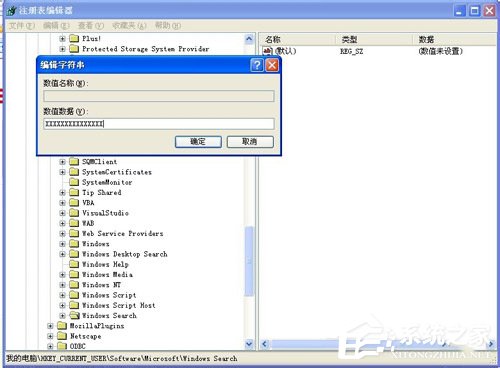
圖示:複製 UninstallString 數值
方法四:補全缺失的卸載檔案再執行卸載
- 若上述皆失敗,通常是
C:\Windows\$NtUninstallKB940157$資料夾被誤刪。 - 下載對應補全包(文中提供百度網盤連結),解壓至
C:\Windows\下。 - 再次執行方法二命令:
%systemroot%\$NtUninstallKB940157$\spuninst\spuninst.exe。 - 彈出英文確認視窗連點「Next」→ 完成 → 選擇「立即重新啟動」。
- 重開機後進入「我的電腦」→「搜尋」,恢復為經典 XP 搜尋介面,表示移除成功。

圖示:卸載程式包下載

圖示:卸載精靈 Next 步驟

圖示:卸載完成重啟

圖示:重新啟動確認

圖示:恢復經典搜尋介面
提醒
- 移除 Windows Search 後,檔案索引功能失效,搜尋速度會變慢;若需索引功能可重新安裝 WDS 4.0。
- 操作前建議建立系統還原點,以防意外。
推薦文章
- 蘿卜家園 Ghost XP SP3 系統 U 盤安裝完整教學:系統之家 PE 實…
- Windows XP 開機畫面 (Boot Screen) 客製化完整教學:Bo…
- Windows XP 複製貼上文字出現亂碼?調整輸入法預設鍵盤版面修復
- Windows 開機核心進程深度解析:11 大關鍵進程功能與安全判斷指南
- 在 Windows XP 上利用 IIS 架設 Web 伺服器完整教學
- 解決 Vista 下使用 QQ 導致藍屏死機問題
- Windows XP 資料夾/檔案無法刪除 9 大解法:常規、磁碟掃描、預讀機制…
- Windows XP 開機優化神器:BootVis 完整使用教學與避坑指南
- PPT 批量複製投影片:幻燈片搜尋器 3 步驟跨檔案合併
- Vista 磁碟配額管理實戰秘籍:Fsutil 命令、跨分區複製、用戶檔案精準清…
copyright © 萬盛學電腦網 all rights reserved