您现在的位置: 萬盛學電腦網 >> 程式設計 > >> 網頁製作 >> HTML5 教學
Canvas 繪製貝塞爾曲線入門:quadraticCurveTo 與 bezierCurveTo 實戰詳解
Canvas 2D 內建二次/三次貝塞爾曲線方法,無需複雜數學即可繪製平滑曲線、閉合路徑。本文從基礎參數到閉合曲線技巧,完整演示核心用法。
兩大核心方法對比
| 方法 | 階數 | 控制點數 | 參數數量 | 適用場景 |
|---|---|---|---|---|
quadraticCurveTo(cpx, cpy, x, y) | 二次 | 1 | 4 | 簡單彎曲、單偏移 |
bezierCurveTo(cp1x, cp1y, cp2x, cp2y, x, y) | 三次 | 2 | 6 | 複雜 S 型、閉合曲線、精確控制 |
基礎繪製流程
const canvas = document.getElementById('canvas');
const ctx = canvas.getContext('2d');

// 1. 開始新路徑
ctx.beginPath();
// 2. 移動到起點
ctx.moveTo(0, 0);
// 3. 繪製曲線
ctx.bezierCurveTo(200, 0, 0, 200, 200, 200); // cp1, cp2, end
// 4. 設定樣式並描邊
ctx.strokeStyle = '#F00';
ctx.stroke();
範例 1:Z 字形控制點對比直線與曲線
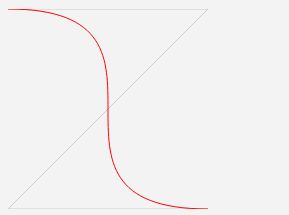
控制點 (200,0) 和 (0,200) 將直線「拉」成平滑 S 型曲線,終點 (200,200)。
範例 2:閉合曲線(心形/水滴/圓角矩形)
ctx.beginPath();
ctx.strokeStyle = '#00F';
ctx.moveTo(100, 0);           // 起點 = 終點
ctx.bezierCurveTo(-100, 200, 300, 200, 100, 0);
ctx.stroke();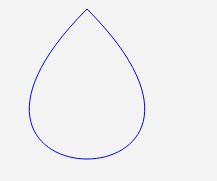
關鍵:起點與終點重合,控制點對稱分佈,即可形成閉合回路。多項式插值難以做到此點。
貝塞爾曲線原理直觀理解
- 控制點不在曲線上,僅決定切線方向與張力
- 二次:一個控制點 → 單一彎曲
- 三次:兩個控制點 → 可產生反轉曲率(S 型)
- 參數 t ∈ [0,1] 線性插值控制點連線,生成曲線軌跡
進階技巧
- 連續曲線:上一段終點 = 下一段起點,控制點對稱(
cp2 = 2*end - cp1)可保證 G1 連續(切線連續) - 路徑填充:
ctx.fill()替代ctx.stroke(),配合ctx.closePath()封閉區域 - 動畫繪製:配合
requestAnimationFrame漸進增加t參數繪製路徑片段 - 點擊檢測:
ctx.isPointInPath(x, y)或ctx.isPointInStroke(x, y)
工具推薦
- cubic-bezier.com:可視化調試三次貝塞爾參數
- Desmos:數學函數圖形驗證
- MDN CanvasRenderingContext2D.bezierCurveTo 官方文檔
推薦文章
- JavaScript 過濾 HTML 標籤的高效方法:正則表達式與替換技巧
- HTML5 前瞻:開發者期待的新特性、遷移挑戰與實戰資源
- 超文本標記語言 (HTML) 核心觀念與結構總覽
- 京東 H5 廣告精選集:從搶錢小雞到媽媽再打我一次的 12 次創意進化
- HTML 表格跨行跨列合併 (rowspan/colspan) 完全指南
- PHP 移除 HTML 標籤:strip_tags、Htmlspecialcha…
- HTML 標籤正則表達式:匹配成對標籤與單標籤的實用模式
- HTML 註釋語法與實務應用:單行、多行、條件註釋、建構工具標記完整指南
- 如何開啟 HTML 格式檔案:瀏覽、編輯、行動裝置與疑難排解
- HTML 表格跨列合併 (colspan) 實作教學:分組標題與總計列完整範例
copyright © 萬盛學電腦網 all rights reserved