您现在的位置: 萬盛學電腦網 >> 軟體知識 > >> 影像處理 >> Maya 教學
Maya 粒子碰撞發射二級粒子特效:石頭滾落帶起灰塵/火花的動力學關係編輯器實戰
效果目標
石頭 (boulder) 滾下斜坡碰撞地面,碰撞點產生灰塵/火花粒子。核心技術:Rigid Body 動力學 + Soft Body 轉換 + Particle Collision Events 發射二級粒子。
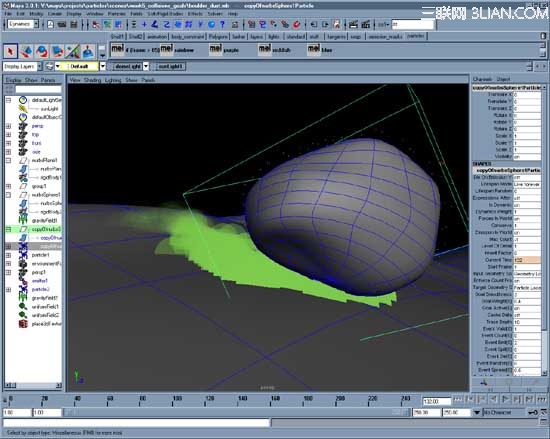
剛體與柔體轉換流程
- 石頭模型添加 Active Rigid Body + Gravity Field。
- 地面平面添加 Passive Rigid Body。
- 選中石頭,Particles → Emit from Object 創建
softbody_particle(隱藏原石頭幾何體,僅顯示粒子)。設置:Duplicate, Make Copy Soft、Hide Non-Soft Object、Make Non-Soft a Goal、Goal Weight 0.8。

- Outliner 中隱藏
copyOfBoulder幾何體,保留softbody_particle。
粒子與地面碰撞設置
- 選中地面,Particles → Make Collide,屬性:
Resilience 0、Friction 0(完全非彈性、無摩擦)。 - Window → Relationship Editors → Dynamic Relationships,確認
softbody_particle與地面碰撞關係已建立。
碰撞事件發射二級粒子 (灰塵/火花)
- 選中
softbody_particle,Particles → Particle Collision Events。 - 設置:
Event Type: Emit、Num Particles、Inherit Velocity、Spread等參數(見圖)。

- 新生成的粒子系統
dust_particle可獨立設置材質、渲染類型、壽命、顏色漸變等。
材質與硬體渲染設置
- 粒子渲染類型:
MultiPoint或Points(硬體渲染)。 - 添加
Color(Per Object) 灰色系,Opacity(Per Particle) 配合 Ramp:出生不透明 → 漸變透明消失。

- Window → Rendering Editors → Hardware Render Buffer 設置多通道採樣 (36 pass)、邊緣柔化、動態模糊,輸出序列幀。
技術遷移與擴展
- 角色腳步揚塵:腳骨骼/蒙皮網格做 Soft Body → 與地面 Make Collide → Collision Event Emit 灰塵,**無需全身 Rigid Body**。
- 劍擊火花:劍尖發射器 + 碰撞事件發射火花粒子,材質用 Additive 融合。
- 現代管線建議改用 Bifrost Graph / MASH / Niagara (Unreal) 節點式程序化特效,邏輯一致但效能與迭代速度大幅提升。
推薦文章
- Maya 商業專案實錄:一周完成荔枝廣告級建模渲染全流程
- Maya 製作《黑客帝國》莫非斯頭像與鋼鐵機械:雙版本模型、UDIM 風格 UV…
- Maya 程序化玻璃材質:Blinn + Ramp 透明度漸變 + 環境貼圖反射…
- MAYA n粒子倒水動畫實戰:從容器填充到Polygons網格轉換渲染
- MAYA可愛三維動畫表情包:24組生動表情GIF展示與創作靈感
- Maya 核心功能實戰:NURBS Loft 歷史記錄 + 路徑動畫 + 晶格變…
- Maya 打造紅色迷你 Cooper:從建模到渲染的完整流程解析
- Maya 多邊形模型結合與分離操作指南
- Maya 實戰案例:從零構建暗夜星空場景
- MAYA《荷塘月色》水墨動畫全流程製作:從工筆重彩美學到三維技術突破
copyright © 萬盛學電腦網 all rights reserved